
How to Archive a Shift
-
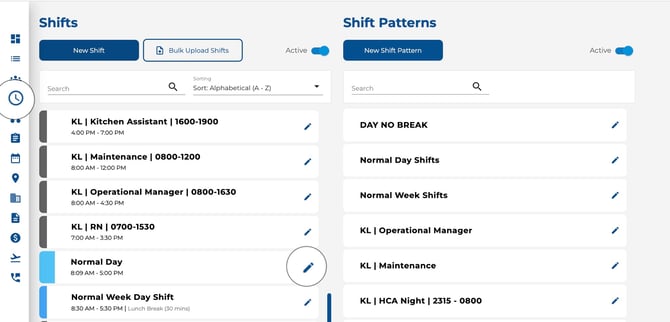
Go to the Shifts page.
-
Click on the shift you want to archive.
-
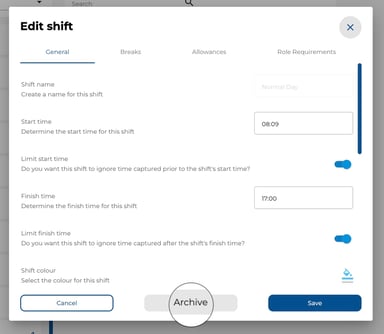
Click Archive in the bottom-left of the modal.
-
Confirm the action.
How to View Archived Shifts
-
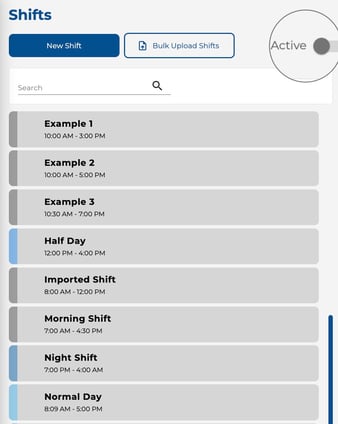
At the top of the Shifts section, turn off the Active toggle.
-
All archived shifts will appear in the list.
How to Restore a Shift
-
Turn off the Active toggle to view archived shifts.
-
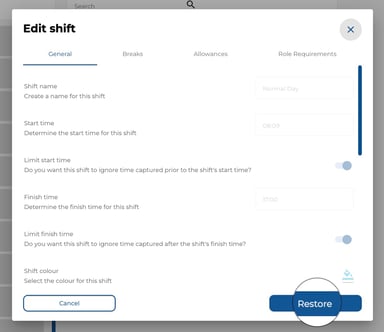
Click on the archived shift you want to restore.
-
Click Restore.
Good to Know
-
Archived shifts are not deleted — all historical data is preserved.
-
Review your shifts periodically and archive any you no longer use to keep the list clean.
- If your company has Feature Access enabled, archiving and restoring require the Delete permission under Manage Shift. Without it, the Archive and Restore buttons are disabled and a tooltip explains the restriction. Company Admins always have full access.