
What You'll See
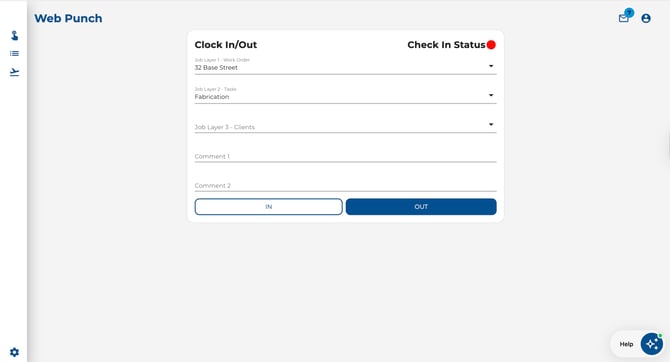
When you open Web Punch from the left-hand navigation, you'll see a simple card in the centre of the screen with everything you need to clock in or out.
The page includes:
-
Clock In/Out card — the main interface for recording your time
-
Check In Status indicator — a coloured dot showing whether you're currently clocked in (green) or out (red)
-
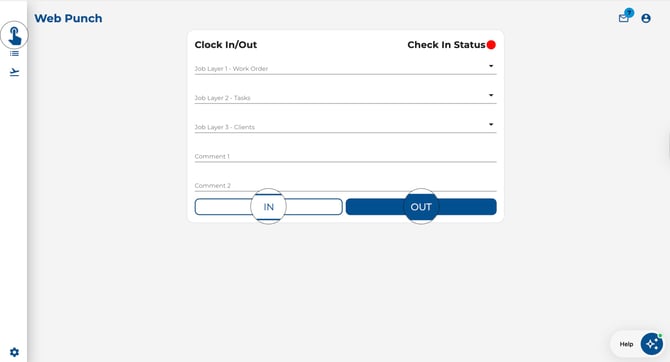
IN / OUT buttons — tap IN to clock in, or OUT to clock out
Step-by-Step: Clock In or Out
-
Click Web Punch in the left-hand sidebar navigation.
-
If required, fill in any optional fields (job layers, comments — see the related guides below).
-
Click the IN button to clock in, or the OUT button to clock out.
-
Check your Check In Status:
-
Green dot = you are currently clocked in.
.jpeg?width=400&height=246&name=Image%2024-04-2026%20at%202.57%20PM%20(2).jpeg)
-
Red dot = you are currently clocked out.
.jpeg?width=400&height=240&name=Image%2024-04-2026%20at%202.57%20PM%20(1).jpeg)
-
-
A success message confirms your action: "Successfully Checked In" or "Successfully Checked Out."

