
Steps
-
Go to the Shifts page and scroll to the Shift Patterns section.
-
Click on the pattern name in the list.
-
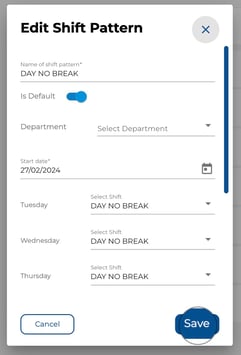
Update the name, default status, or shift assignments as needed.
-
Click Save.
-
Select the effective date from which changes should apply, then confirm.
.jpeg?width=286&height=178&name=Image%2015-04-2026%20at%204.43%20PM%20(1).jpeg)
Good to Know
-
Changes only affect roster entries from the effective date onward — past roster data is not altered.
-
If you change the default pattern, only newly added employees will receive the updated pattern. Existing employees keep their current assignment.