
How to Upload a Document
-
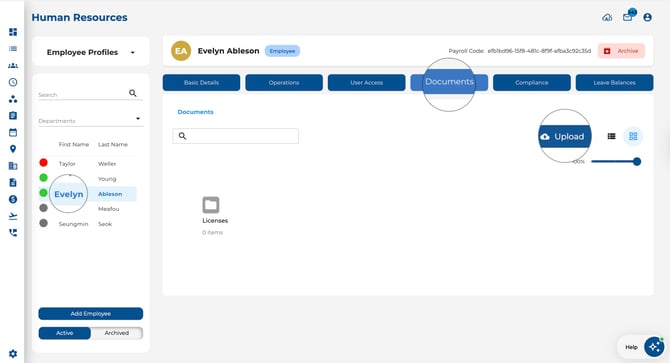
Open the Employees page and select an employee.
-
Click the Documents tab in their profile.
-
Click the Upload button or drag and drop files into the upload area.
-
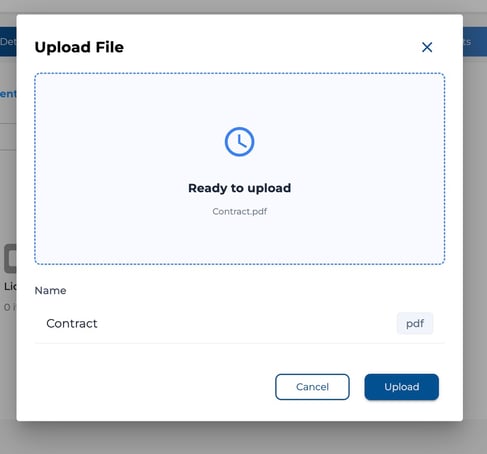
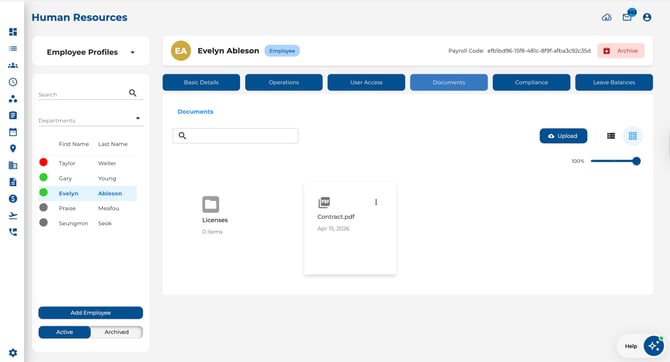
The file will appear in the document list once uploaded.
How to Manage Documents
-
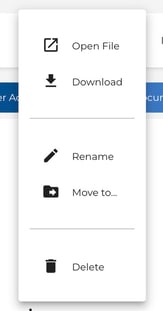
Open — Click a document to preview or open it.
-
Download — Download a copy to your device.
-
Rename — Change the file name for better organisation.
-
Delete — Remove a document you no longer need.
Forms Folder
A read-only Forms folder also appears in the employee’s Documents tab. It contains completed form submissions relevant to that employee, organised by group, template, and submission date.
- Click into the Forms folder to browse submissions.
- Open or download a PDF export of any submission, or access file attachments uploaded with the form.
- This folder is read-only — you cannot upload, rename, move, or delete items inside it.
Tips
-
Use clear, descriptive file names so documents are easy to find later.
-
For company-wide document management, use the Organisation View > Documents section.