
Adding a Time Entry
-
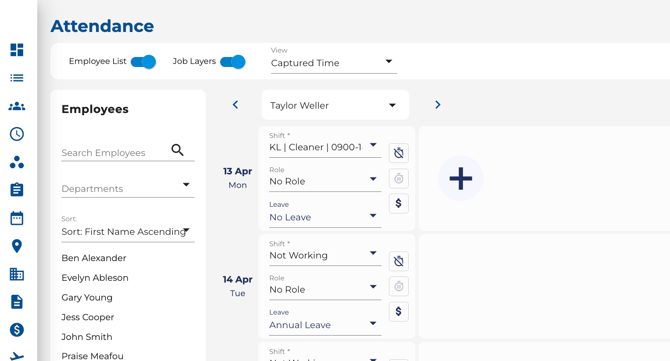
Click the + button on any day row to create a new check-in/check-out pair.
-
Enter the start and end times.
-
Optionally assign a shift or job items.
Editing a Time Entry
Timecloud offers two ways to edit a time entry — a fast inline edit for quick time corrections and a full modal for more detailed changes.
Quick Edit (Inline Time Edit)
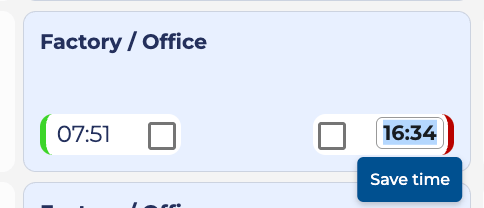
Use Quick Edit to change a clock-in or clock-out time directly on the timesheet without opening a separate dialog.
-
Click on the displayed time (e.g. 09:00 or 17:30) on a check-in or check-out entry. The time turns into an editable input field.
-
Type the new time in HH:mm format (e.g. 08:45).
-
Press Enter or click the Save time button to save your change.
-
Press Escape or click anywhere else on the page to cancel without saving.
-
You can also Quick Edit an empty check-in or check-out slot — click the empty slot and type a time to fill it in.
Quick Edit is ideal when you just need to adjust a time — no need to open the full editor.
When Quick Edit Is Not Available
The inline edit is not available when the entry is locked. In those cases, clicking the time will open the full edit modal instead. Quick Edit is unavailable when:
-
The day has been approved (approval-locked).
-
The pay period is locked.
-
You do not have edit permissions for attendance.
Full Edit (Edit Modal)
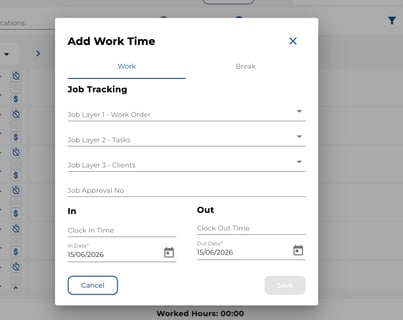
- Click on the time entry card header (the job name or entry label area) to open the full edit modal.
- In the modal, you can:
- Adjust both clock-in and clock-out times.
- Assign or change job items.
-
- Add or edit comment fields (if enabled by your administrator). Comments are shared across both the clock-in and clock-out records. Comment fields only appear when you are editing your own attendance — they are not visible when a manager views another employee's entry.
- Update other details.
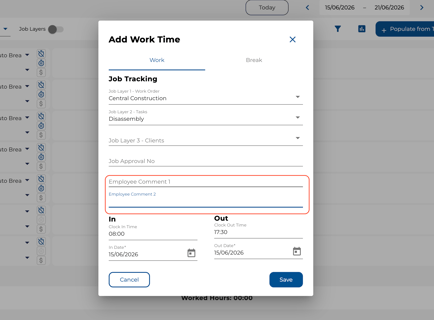
- Click Save to apply your changes or Cancel to discard them.
Deleting Time Entries
-
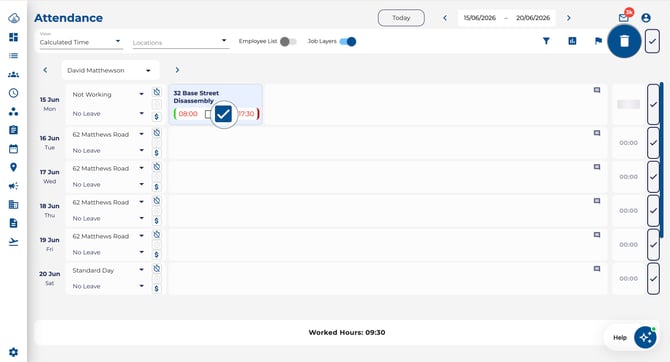
Select one or more time entries using the checkboxes.
-
Click the Delete (trash) button in the toolbar to remove them.
Tip: Use Quick Edit for fast time corrections and the full modal when you need to update job items, comments, or other details. Deleted time entries cannot be recovered — double-check before confirming.