Summary Widgets
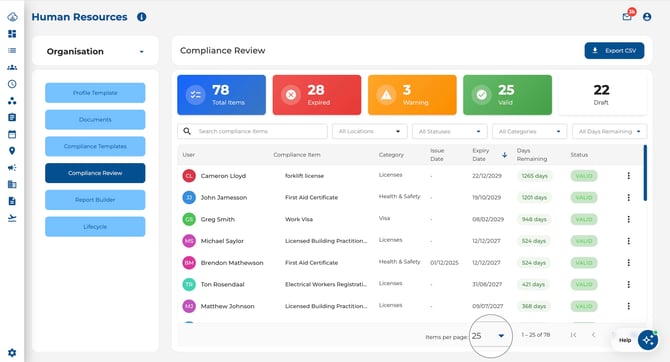
At the top of the page you will see five clickable summary cards:
-
Total Items — shows the overall count. Click to clear all filters.
-
Expired — items past their expiry date. Click to filter to expired only.
-
Warning — items within their warning threshold. Click to filter.
-
Valid — up-to-date items. Click to filter.
-
Draft — items not yet finalised. Click to filter.

Filtering and Searching
-
Search — type in the search bar to find items by name, employee, category, or department.
-
Department — filter by one or more departments. Only employees who belong to the selected department(s) are shown. Your company may label this field differently (e.g. "Team" or "Division")
-
Status — multi-select filter (Valid, Warning, Expired, Draft).
- Category — filter by compliance group.
-
Days Remaining — filter by time window (30, 60, 90, or 120 days or less).
-
Click the clear filters icon to reset all filters at once.
.jpeg?width=670&height=35&name=Image%2006-07-2026%20at%2010.37%20AM%20(1).jpeg)
Review Table
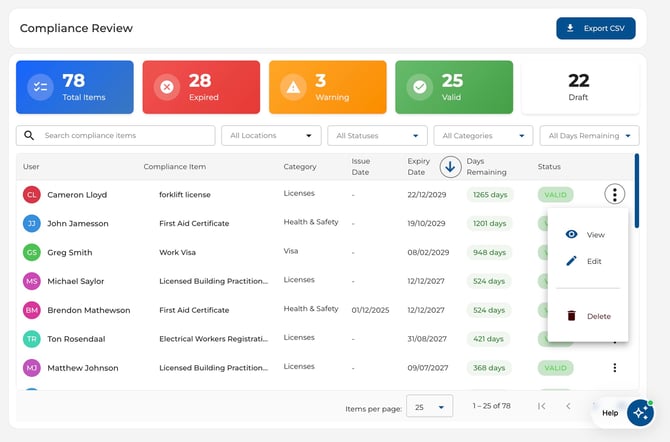
The table displays columns for User (with avatar), Compliance Item, Category, Issue Date, Expiry Date, Days Remaining, and Status.
- Sort — click any column header to sort the table by that column. Click again to reverse the order.
- Use the three-dot menu on each row to View, Edit, or Delete an item.
Exporting
Click the Export CSV button in the page header to download all displayed compliance data to a spreadsheet. The export respects your current filters and sort order, and includes department information for each employee.
.jpeg?width=670&height=363&name=Image%2006-07-2026%20at%2010.39%20AM%20(1).jpeg)
Pagination
Use the pagination controls at the bottom to navigate through results. Choose page sizes of 25, 50, 100, or 200 items per page.