
How to Open Your Profile
-
Click the account icon in the top-right toolbar.
-
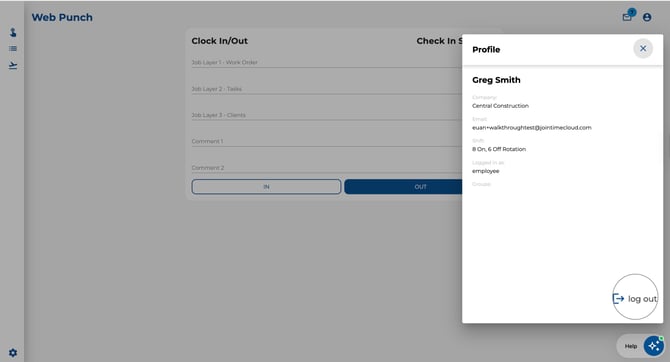
A dialog will appear showing your account details:
-
Name — Your first and last name.
-
Company — The company you belong to.
-
Email — Your registered email address.
-
Shift — Your assigned shift pattern (if applicable).
-
Logged in as — Your access level (e.g. Company Admin, Sub Admin).
-
Groups — The departments or user groups you belong to.
-
.jpeg?width=670&height=363&name=Image%2024-04-2026%20at%203.46%20PM%20(1).jpeg)
How to Log Out
-
Click the account icon in the top-right toolbar to open your profile.
-
Click the Log Out button at the bottom of the dialog.
-
You will be returned to the login page.
Note: Employee sessions are not persistent — if you close your browser, you will need to log in again.